
Order meeting catering when you book the meeting in Outlook
Sticky notes, forgotten orders, and a kitchen that hears about changes at the last minute? With VisionCatering you order meeting catering directly in Outlook when you book the meeting. The kitchen sees every order and change on a digital overview, and your colleagues sign up for lunch in under a minute.

Why choose VisionCatering for meeting catering?
With VisionCatering, you get a digital platform that solves complex administrative tasks while delivering a better experience for both employees and canteen staff.
Streamlined and paperless process for meeting catering
Say goodbye to manual labor and paperwork. VisionCatering digitises your entire canteen and meeting management so you can focus on your business.
Increased employee satisfaction
An intuitive user interface makes lunch sign-ups and meeting catering quick and effortless — resulting in higher employee satisfaction.
See catering bookings and lunch sign-ups at a glance
The integration with Dynamics 365 and Office 365 ensures that VisionCatering fits perfectly into your existing workflow without unnecessary interruptions.

Powerful features developed and designed for your business
VisionCatering combines ease of use with advanced features that ensure overview, efficiency and time savings for both employees and the canteen.

Lunch registration in less than one minute
Make it easy for your employees to register or unsubscribe from lunches through a fast and easy-to-use interface.

Meeting catering made simple
Schedule and manage meeting catering directly in the app so everything runs smoothly and without complications.

Part of Office 365 and integrated for Business Central
Leverage existing ERP and account platforms to track and manage costs quickly and efficiently.

Reporting and overview
Access detailed data overviews to help you keep track of sign-ups and costs.

Admin tools for canteen staff
Give your canteen staff the ability to easily plan and get a clear view of daily and weekly needs.

Fast deployment and minimal training
VisionCatering is easy to install and requires minimal time investment to train employees, making the transition seamless.
Order coffee, water and food for the meeting in Outlook
Forget the catering chaos. VisionCatering lives in Outlook—book your meeting and lunch together. One click sends orders to the kitchen screen. Food arrives when your meeting starts.
Mødeforplejning 01
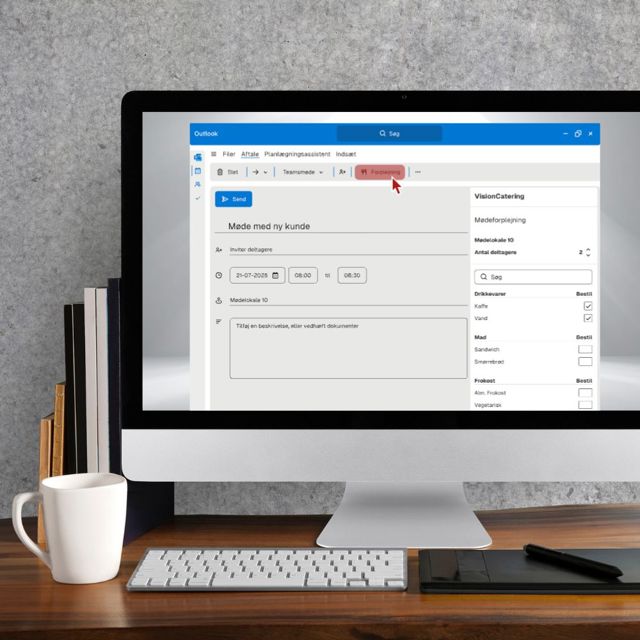
Order meeting catering while you book the meeting
VisionCatering is an app for Office 365, so the solution lives inside Outlook. When you book a meeting in the Outlook calendar, you can click the knife-and-fork icon and digitally specify the catering you want for the meeting in that meeting room. Once you have chosen the desired meeting catering, the kitchen, canteen or whoever handles delivery is automatically notified of what to deliver for the meeting. The day's requested meeting catering is automatically shown on a digital overview, which is continuously updated as meetings change and when the catering has been delivered.
Frokosttilmelding 02
Digital frokosttilmelding
With VisionCatering, employees can easily sign up for the lunch scheme - directly in Outlook - for the months or dates when they are at the workplace. Employees can choose between the different lunch options the kitchen or canteen may offer (lunch with meat, vegan etc.), so the kitchen only needs to buy and prepare food for those who take part. This avoids food waste, and the kitchen always knows exactly how many people to cook for.
Overview of orders 03
A digital, always up-to-date overview for the kitchen or canteen
VisionCatering gives kitchen staff (or anyone else who delivers meeting catering and lunch) a digital, always up-to-date overview of the day's meeting catering orders and the number of lunch sign-ups. Changes to orders are clearly marked in the overview, so they can be approved - or you can quickly let the person ordering know what can be delivered instead, for example because the agreed deadline for new orders or changes has passed. The person ordering has of course already been notified that the deadline was exceeded. Once an order has been delivered, the list moves up and shows the day's next delivery at the top.
Integration with your financial system 04
Automatic settlement of costs
Easily integrate VisionCatering with your existing systems. With open APIs and user customizations, the solution can be tailored precisely to your company's requirements. If you want ordered meeting catering to be paid by the employee's department, the cost can automatically be loaded into your financial system, so the accounting team can charge the individual department for the cost. The accounting team can also make sure the individual employee is charged the cost (for example for lunch or private purchases) via the integration option that VisionCatering offers. All costs can be exported to Excel or made available via a web service.
Pricing for VisionCatering
The unit price decreases as you become more users in Office 365. Free for small businesses with up to 3 employees.
Save 5% on an annual subscription
- Easy ordering directly in Outlook or browser
- Automatic counting of participants in the meeting request
- Customize menu selections and delivery info without contacting the canteen
- Comprehensive overview of all meetings and bookings throughout the company
- Possibility to switch on and off the lunch scheme
- Possibility to split orders into departments or food centres
- Export reports for use in administration and financial management
- All features included in VisionCatering up to 100 users
- DKK 2 off per user per month for 100+ Office 365 users
Make your workday smarter with our apps
See more of our innovative apps that simplify your workflows and increase efficiency. From inventory management to integrations and more. Our apps are designed to make a difference in a complex world.
Frequently asked questions
Inspired, but still have questions? Below we have gathered the questions new customers ask most often — they may also give you a better feel for the solution:
From Outlook booking to posted catering costs
Meeting catering is ordered where the meeting is created: in Outlook. With VisionCatering, the meeting organiser picks the catering in the same workflow as the meeting invitation – and the kitchen sees orders and changes immediately on a digital overview. No sticky notes, no forgotten changes.
Afterwards, the finances take care of themselves: cost centres are mapped to accounts – per location if needed – and the catering orders are imported directly into the general journal with correct quantities and dimensions. The catering is posted without anyone typing a voucher.
From DKK 10 per user per month for up to 100 Office 365 users – with a 30-day free trial.

Let's optimize your business today
Over the years we have seen — and solved — a lot of the challenges our customers struggle with. Maybe we can help you too, by digitalising manual workflows and making them efficient. We happily accept the challenge.

