Do you spend too long approving purchase invoices? With VisionApproval you approve invoices and add dimensions and projects in one smooth flow.
Setting up VisionApproval very easy with the VisionApproval setup image:
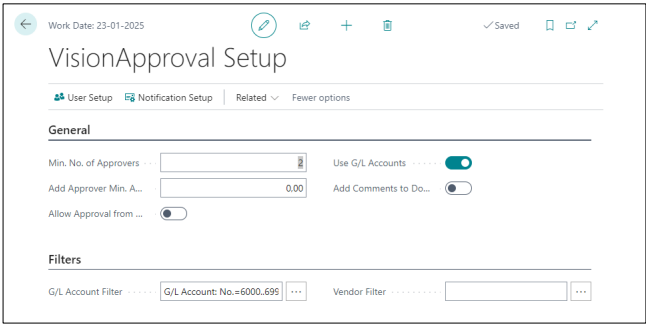
Specify the minimum number of approvers (typically 2 approvers), and if approvers must assign financial accounts to the purchase invoices, enable “Use G/L Accounts”, and if approvers only want to see a limited number of financial accounts, specify the desired filter under “Filters”.
Under “User setup” you can specify who is allowed to authenticate on behalf of each approver (set under Authenticator).:
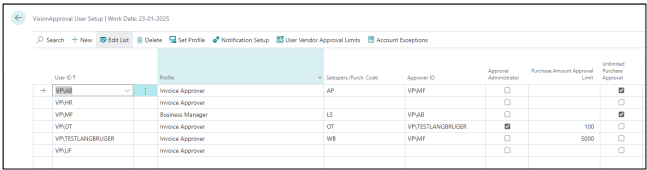
Note that one approver can have multiple Authenticator Administrators.
From here, you can set up the user profile to “Invoice Approver, so that users do not have to do this.
The notification setup acts as your default — it kicks in whenever a user has not set up their own.
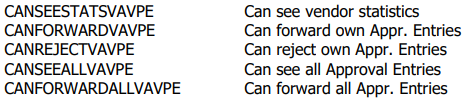
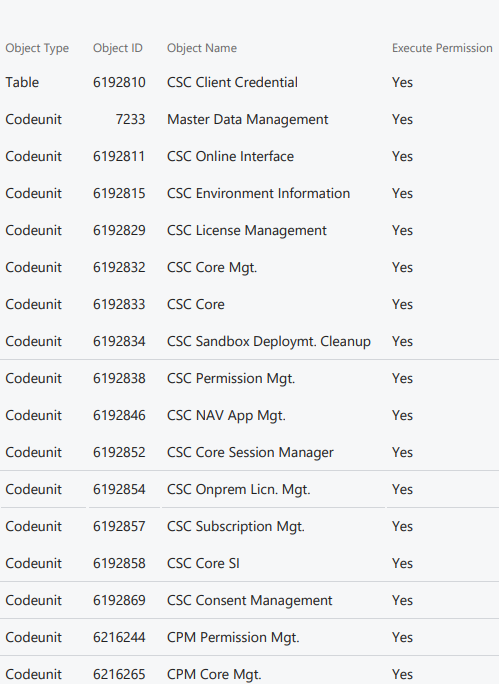
An additional Privilege Set must be created with the following rights (if one of the following objects does not exist, just skip it):
Finally, the following option rights sets are available: